
Chatbots are everywhere these days, aren’t they – but have you considered creating a talking AI chatbot that sounds completely natural? Imagine an AI avatar that doesn’t just respond to queries by text but does so with a voice that feels real and engaging. This talking AI avatar could take the form of yourself or someone from your team, with the voice perfectly synchronised to deliver a lifelike conversational experience. Or you could take it even further and make it a video avatar of one of your team. It’s like having a digital twin that can interact seamlessly with users, providing a personal touch to AI interactions and available out of hours too.
Here we describe in detail how you can create a real-time realistic video avatar knowledge agent using Microsoft Foundry.
We highlight the key steps, technical complexity, the use of Azure solutions such as retrieval augmented generation (RAG), Azure Text-to-Speech Avatars, Azure OpenAI GPT and the ability to curate knowledge sources for specific use cases.
Key building blocks of a video avatar knowledge agent built in Foundry
1. Azure Blob Storage
The Document Source stores the knowledge base files (PDFs, docs, etc.) that the agent will draw information from. Blob storage serves as the central content repository, allowing Azure Search to index the data. So if you want the agent to be expert on Mozart for example, then you would curate lots of documents on Mozart and his music etc. and upload them to the blob storage account. This data will get indexed (see AI Search below) and the agent will use it in its responses. So if you wanted the agent to be an expert on your HR policies instead, you would upload all those relevant documents.
2. Azure AI Search
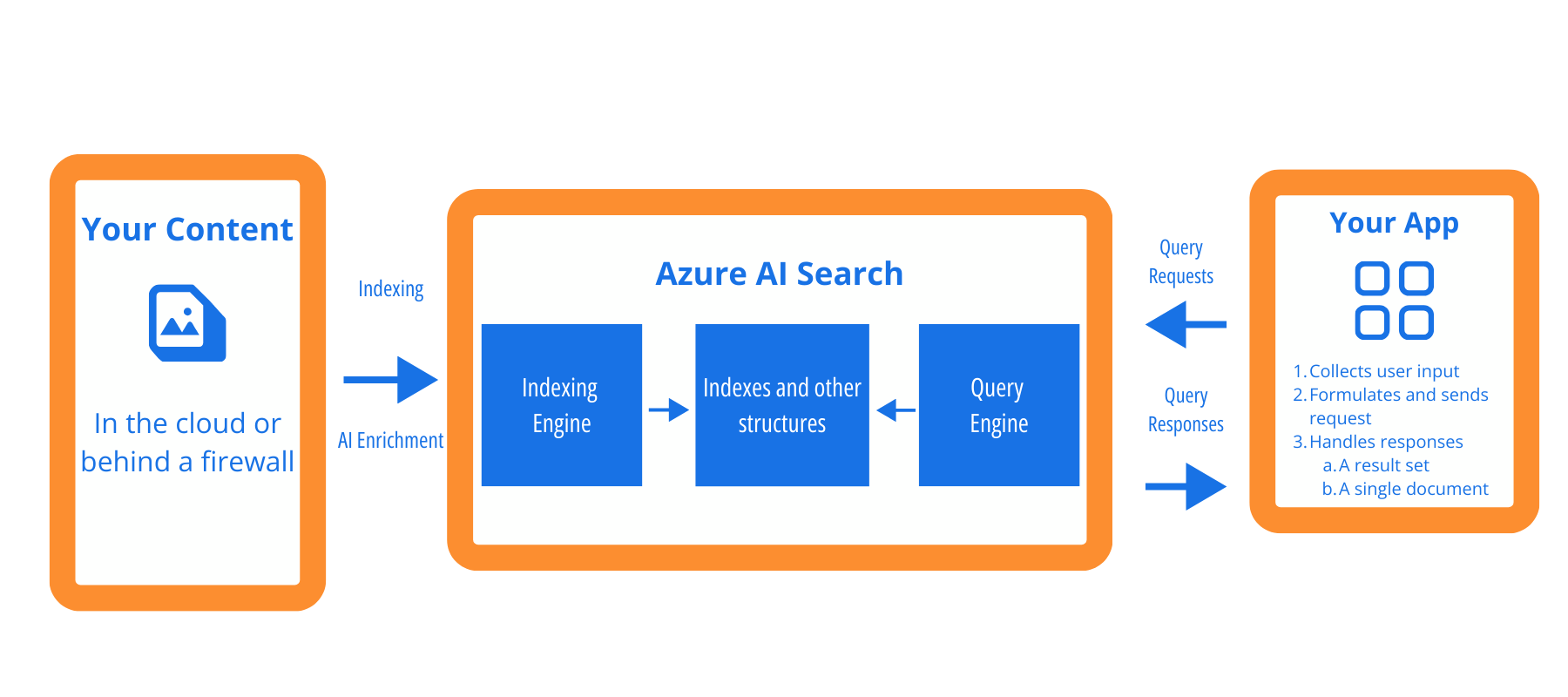
Azure AI Search is a fully managed, cloud-hosted service that connects your data to AI. The service unifies access to enterprise and web content so agents and LLMs can use context, chat history, and multi-source signals to produce reliable, grounded answers.
Azure AI Search Indexes the documents from Blob storage and enables fast semantic search over them. It uses a vector index (embeddings) to find relevant content by meaning, not just keywords. The search service can ingest the blobs via an indexer, break content into chunks, and apply an OpenAI Embeddings skill to generate vector embeddings for each chunk during indexing. It supports hybrid queries (keyword + vector) and can rank results using semantic relevance for best answer grounding.
3. Retrieval Augmented Generation (RAG) Pattern
The RAG pattern is used to define where curated documents are indexed using Azure AI Search and vectorised via an embeddings model to enable semantic search. This allows your agent to retrieve contextually relevant information rather than relying solely on keyword matching.
The difference between Azure Foundry and Copilot Studio is that Copilot Studio automates the RAG process when adding a knowledge source, whereas Foundry requires manual setup and understanding of the underlying mechanisms, offering more technical depth and customisation.
4. Chatbot And Large Language Models
The Azure chatbot component uses the generative Azure OpenAI Large Language Model (LLM): one for creating embeddings and another for interpreting user queries and generating answers, with the system retrieving relevant indexed information and providing responses based on the curated dataset. This curated dataset is based on your own content so that you can be assured that the Avatar is basing its responses on validated information that you have provided.
The LLM is used in a Retrieval-Augmented Generation (RAG) pattern: the query-relevant text passages from Azure Search are passed into the prompt, so GPT-4 produces grounded answers, reducing hallucinations. Azure OpenAI ensures enterprise-grade security (data stays in Azure, with compliance guarantees) and provides token-based pricing (e.g. ~$0.03 per 1k input tokens, $0.06 per 1k output for GPT-4)
5. Avatar Voice And Video Generation
Users can create avatar‑based video content without coding using the tools available in Microsoft Foundry – the Azure AI Speech Service – Custom Text to Speech Avatar.
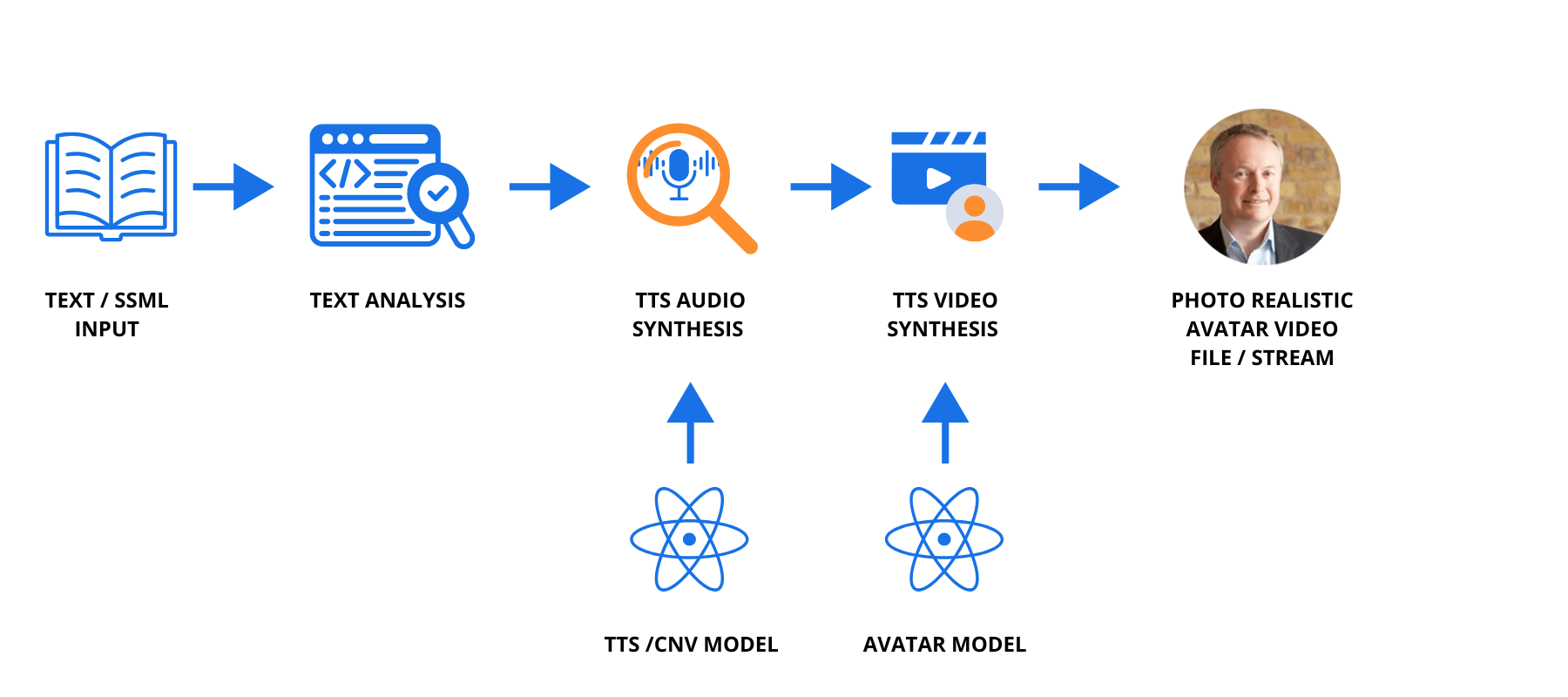
Text‑to‑speech avatars convert written text into a digital video of a photorealistic human speaking with natural‑sounding Azure AI voices, and a collection of standard avatars is available in this library.
Azure AI Text to Speech generates the voice component of the avatars and the live chat avatar tool in Speech Studio supports real‑time conversational avatars.
Text to speech avatar capabilities include:
- Conversion of text into a digital video of a photorealistic human speaking with natural-sounding voices powered by Azure AI text to speech.
- A collection of standard avatars.
- Azure AI text to speech generates the voice of the avatar.
- Synthesises text to speech avatar video asynchronously with the batch synthesis API or in real-time.
Using Voice Live to create custom Avatars
Users can also create voice agents with avatars through a tool called Voice Live.
By combining text‑to‑speech neural models with Photo avatar VASA‑1 models users can create high‑quality, lifelike synthetic talking avatars designed to follow responsible AI practices.
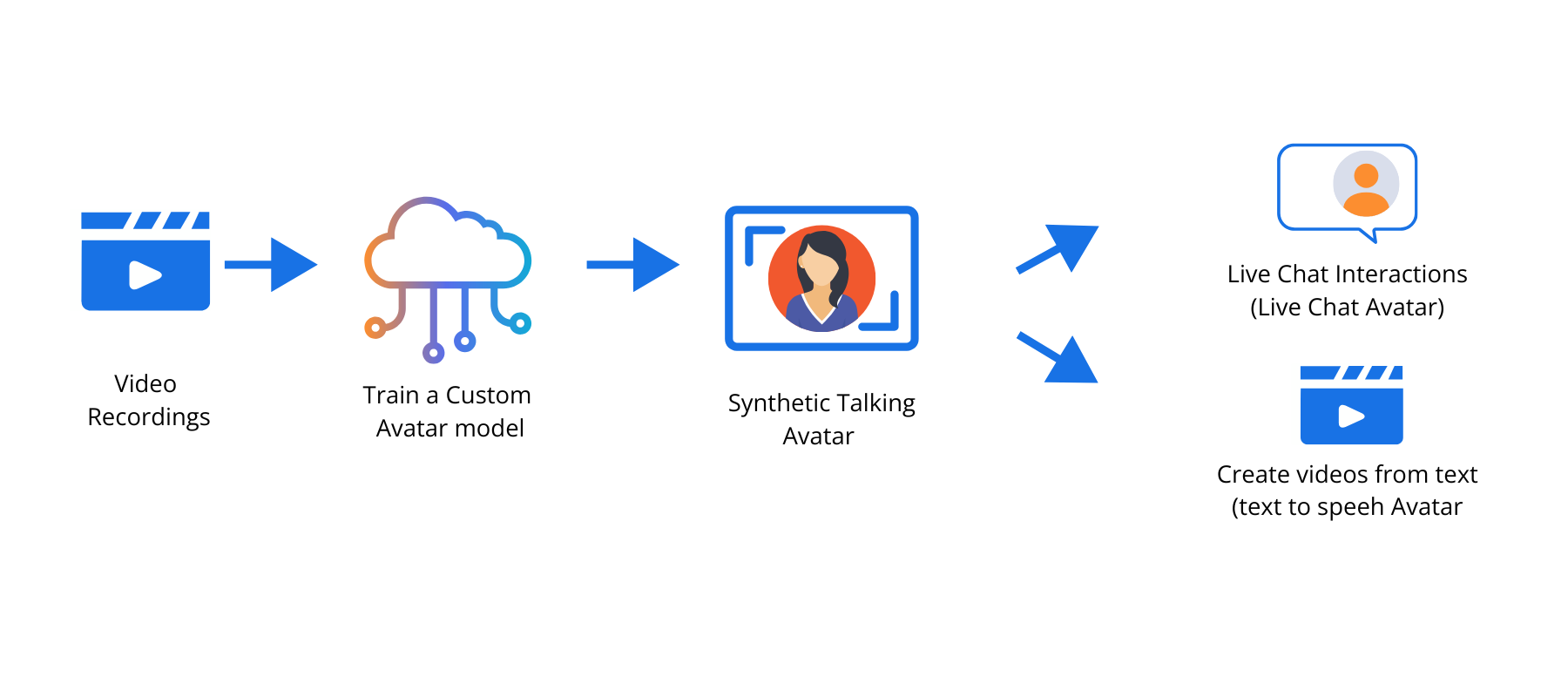
If you wish to base your Avatar on a real person in your business, then the advanced feature of the Avatar agent allows you to train your model to replicate the voice and movements of the person you are creating the Avatar of. This enables the avatar to speak answers dynamically rather than playing back pre-recorded audio.
You can create custom text to speech avatars that are unique to your product or brand. For a custom video avatar, all it takes to get started is a short series of video recordings (described in more detail below); and for a custom photo avatar, it only needs one photo. If you’re also fine-tuning a professional voice for the actor, the avatar can be highly realistic.
The voice sync for your avatar is trained alongside the custom avatar using audio from the training video. The voice is exclusively associated with the custom avatar and can’t be independently used.
For a Custom Avatar model (instead of standard avatar model in Speech studio), below is the process to train and deploy a customized model:
Consent to use Voice Talent
If you are using a voice talent to create your Avatar, you will need to create a consent video in Microsoft Foundry. This is a mandatory recording where voice or avatar talent provides verbal permission for the use of their likeness to create synthetic, photorealistic avatars or voices. This video ensures compliance with Microsoft’s Responsible AI guidelines, verifying that the talent consents to the recording and its application in AI-generated content.
For the voice talent consent video, here is a predefined script provided by Microsoft.
Creating the training video for your custom Avatar
For the training video you will need to record and upload the following pieces of video content:
Naturally Speaking
Videos of the individual speaking in status 0 with natural hand gestures. At least one piece of 5-minute continuous video recording is required. Maximum 30 minutes in total.
Silent Status
Video data of the individual remaining status 0 but not speaking. One 1-minute video clip is required.
Gesture (optional)
Videos of the individual performing gestures. Each gesture video should be within 10 seconds. Gestures should start from status 0 and end with status 0. Up to 10 gestures supported.
Status 0 speaking (required for gestures)
Video data of the individual remaining status 0 while speaking. 3-5 minutes required.
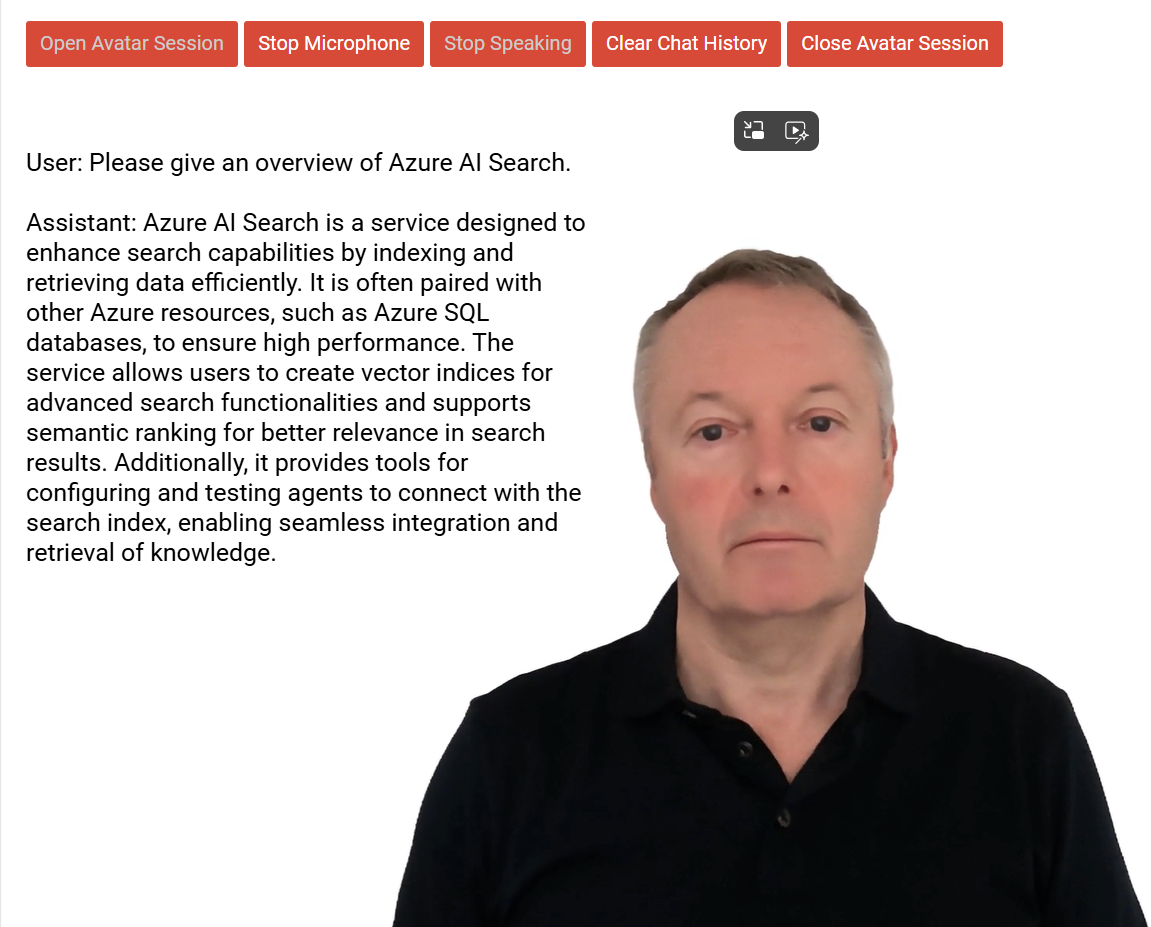
Below is an example of the live video Avatar knowledge agent that we created using Microsoft Foundry with our very own Jon Milward:
Pricing for your video Avatar
The solutions we have described encompass three different Azure services :
- Microsoft Foundry
- Azure AI Search
- Azure Speech services (Text to Speech & Custom Avatar)
1. Microsoft Foundry pricing
Azure OpenAI Service delivers enterprise-ready generative AI featuring powerful models from OpenAI. Pricing and cost management solutions includes
- Standard (On-Demand): Pay-as-you-go for input and output tokens.
- Provisioned (PTUs): Allocate throughput with predictable costs, with monthly and annual reservations available to reduce overall spend.
- Batch API: Language models are also now available in the Batch API for global deployments and three regions, that returns completions within 24 hours for a 50% discount on Global Standard Pricing.
Here are the pricing details depending on your chosen model.
2. Azure AI Search pricing
Costs include data storage cost and compute for Search Unit and are detailed here.
3. Azure Speech Service Pricing
Apart from the Text to Speech processing costs, if you are using the Custom Avatar, below are the approximate costs.
- Training (Custom Voice Model): ~$52 per compute hour, capped at ~$4,992 per training run (billed per second).
- Endpoint Hosting: ~$4.04 per model per hour (can suspend to save costs).
- Speech Synthesis: Standard rates for Custom Neural Voices (e.g., ~$24-$48 per 1M characters).
- Avatar Rendering: Billed per minute for video output, separate from TTS.
- Initial Setup Fee: A one-time fee (around $2,048 mentioned in application context) may apply for the custom model training/onboarding process
Why use Microsoft Foundry rather than Copilot Studio?
Copilot Studio has certain limitations in terms of capabilities and control, while Foundry provides more power and flexibility for advanced scenarios, making it suitable for bespoke solutions beyond standard chatbot implementations.
Potential Applications for Azure AI Avatars
The Azure Foundry Avatar has a range of potential applications in customer service and technical support. Imagine if you were to offer this as an out-of-hours helpdesk assistant, that could answer customer queries, based on your own technical support documentation? There are also applications for internal HR support, guiding users through policy documentation, and for training new recruits into your organisation.
What Next?
if you’d like to discuss how to build your own Avatar using Microsoft Foundry, or have other AI automation requirements for the Microsoft AI toolset, please get in touch for a free discussion with one of our Certified Azure technical consultants.
One final thing
If you’ve enjoyed reading this Blog Post, then sign up at the bottom of this page to receive our monthly newsletter where we share new blogs, technical updates, product news, case studies, company updates, Microsoft and Cloud news (scroll down to the sign up block on this page)
We promise that we won’t share your email address with other business or parties, and will keep your details safe. You can choose to unsubscribe at any time.

Contact our Microsoft specialists
Phone or email us to find out more – or book a free, no-obligation call with our technical consultants using the contact form.
“It’s great to work with the Compete366 team, the team members are really knowledgeable, helpful and responsive. No question is too difficult for them. They have really helped us to manage our Azure costs and ensure we have the right environment. When we bring a new customer on-board we can scale up immediately via the Azure portal and quickly make environments available to our customers.”
“We also find that there’s never a heavy sales pitch from them – they are technically focused and recommend what’s right for us.”
“We had great support from the Compete366 AVD expert, who was really helpful, and guided me through options to tackle issues that arose.”
“The great thing about our AVD set up is that we have a custom set up for each project which Compete366 showed me how to do. And with the scalability and flexibility of AVD – we can meet clients’ expectations and get project users up and running more quickly.”
“We were immediately impressed with the advice that the Compete366 specialists in Azure Architecture were able to provide. This was all new to us and we really needed some external expertise that we could use to get our questions answered. The beauty of working with Compete366 is that we transferred our Azure consumption to them, and at the same time received all of their advice and guidance free of charge.”
“Working with Compete366 has been like extending our own team – they are extremely and easy to work with. Right from the outset, it was clear what was on offer – everything was presented to us in a straightforward and uncomplicated way. They also provided just the right level of challenge to our developers and saved us time and money by suggesting better ways to implement our infrastructure.”
“Compete366 were able to help us leverage some useful contacts in Microsoft. We really value the expert advice and guidance that they have offered us in setting up a highly scalable infrastructure. We are also setting in place a regular monthly meeting which will allow us to further refine our architecture and ensure we keep on track as our requirements grow and change.”
“I have been delighted with the migration, where my team worked very hard, supported by expert advice from Compete366, and achieved everything in the timescale we had set out. Compete 366 made sure that we didn’t make any expensive mistakes, and guided us through the process”